Next.js development · App Router · rendering · deployment
Next.js development company for US businesses,
rendering choices made on purpose and explained in plain language.
We build sites and web applications in Next.js: App Router structure, a considered mix of static and dynamic rendering, a documented component system, CMS and API integration, caching and image handling. Delivered remotely from Mumbai, India, with the reasoning written down.
- App Router
- Rendering strategy
- CMS and APIs
- Caching
- Deployment

Where Next.js projects drift
A powerful framework makes it easy to build the wrong thing quickly.
- 01
Everything rendered the same way
Pages that rarely change get rendered on every request, or content that changes hourly is frozen at build time. Rendering should follow how often content changes and who needs to see it.
- 02
Components that grow into a tangle
Without conventions for where logic lives, pages accumulate fetching code, styling and state, and every later change touches several files at once.
- 03
A CMS bolted on afterward
When editors discover mid-project that they cannot preview, schedule or restructure content, a headless set-up quietly becomes a developer-only tool.
- 04
Caching nobody can explain
Stale pages, over-eager revalidation and surprise server costs usually come from caching rules that were set once and never written down.
How we approach Next.js
Decide how each page is rendered, then document why.
We list your page types, estimate how often each changes and who sees it, and assign a rendering approach to each. The component structure, content source and caching rules follow from that table. Because the table is written down, the next developer can read the reasoning instead of reverse-engineering it.
- Each page type has a stated rendering strategy and a reason for it.
- Data fetching lives in clearly named server-side modules, not scattered through components.
- Editors can preview and publish without a developer, from day one of the content set-up.
- Caching and revalidation rules are listed in one place and tested.
- The README explains how to run, build and deploy the project.
What we deliver
Next.js work we take on
Engagements range from a marketing site with a headless CMS to an application with accounts and dashboards. The proposal lists the pieces below that apply and the depth of each.
App Router architecture
Routes · layouts
Rendering strategy
Static · dynamic
Component architecture
TypeScript · components
CMS integration
Headless · preview
APIs and server logic
Routes · webhooks
Caching and revalidation
Cache · revalidate
Image and asset handling
Images · fonts
Deployment and documentation
Deploy · README
Next.js for US teams
The framework is a team decision, not only a technical one.
We work remotely from Mumbai, India, and have no US office. Next.js projects touch hosting, content and engineering at once, so alignment on who owns each matters as much as the code.
Hosting and cost are choices to make together
Where a Next.js site runs affects cost, scaling and how caching behaves. We describe the options plainly and the trade-offs, then deploy to the host your company selects.
Existing engineering teams
If your company has developers, we can work in your repository, follow your conventions and hand over through pull requests, rather than delivering a separate codebase to reconcile.
Content teams in several places
When editors, designers and developers sit in different time zones, preview links and clear publishing rules keep content moving without waiting for a call.
Written decisions, not tribal knowledge
Architecture notes record why a page is static or dynamic, what is cached and what triggers a refresh, which is exactly what is hardest to recover later.
How we work
A Next.js build in five reviewed steps.
Each step ends with a written output or an approval point. Timings are confirmed in the proposal.
Requirements and page inventory
We list page types, content sources, integrations and who edits what. Output: a page inventory and a short list of open decisions for you.
Rendering and architecture plan
Each page type is assigned a rendering strategy, content source and caching rule. Decision: you approve the plan or ask for an alternative we have outlined.
Component and content build
Components, routes and the CMS connection are built and shown on a preview deployment. Review: editors try real publishing tasks before the build continues.
Integration, testing and review
Forms, APIs and key journeys are tested on several devices, and the code is reviewed. Output: a test summary and agreed fixes.
Deployment and handover
Production release with a checklist, then written notes on architecture, caching and deployment. Approval: you confirm the handover list matches the proposal.
Scope
What a Next.js engagement includes.
Page types, integrations and testing depth are set in the proposal. This is the general boundary.
Usually included
- Route, layout and component architecture
- A rendering and caching plan for each page type
- CMS or API integration named in the proposal
- Forms, route handlers and agreed integrations
- Deployment configuration and a launch checklist
- Architecture and handover documentation
Scoped and quoted separately
- Visual design (see website design services) unless included in the proposal
- Hosting costs and ongoing infrastructure management
- Large custom applications beyond the agreed feature list
- Performance score targets, which depend on content and hosting
Website work from our portfolio, across industries and regions

A confident, finance-grade website for Wise Business Plans, a business plan and funding advisory firm serving founders, investors and USCIS immigration cases.

A luxurious, architecture-led website for TouchKey, India's premium smart biometric door lock brand, built around real product photography and genuine installation galleries.
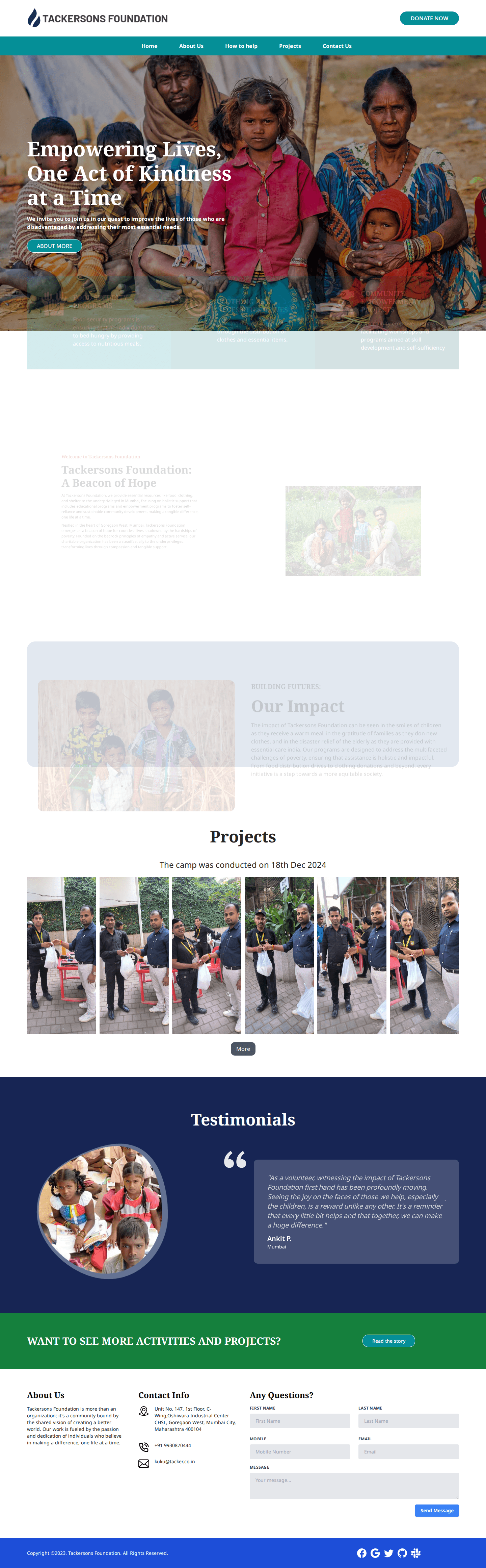
A warm, credibility-driven website for Tackersons Foundation, a Mumbai charitable nonprofit, built around genuine relief-camp photography and a real Certificate of Incorporation.

A warm, credible website for Shri Raam Astrologer, a Mumbai Vedic astrology practice, built around a glowing zodiac wheel hero and tasteful parchment-scroll service graphics.

A confident, near-black portfolio website for Pulp, an independent Bandra brand strategy and design agency, built around a striking mixed-media project grid and personal partner bios.

A cinematic, tech-forward website for PolicyGrace, a Mumbai InsurTech insurance broker, built around a striking eagle hero photograph and real dashboard mockups.

Wise Business Plans
A confident, finance-grade website for Wise Business Plans, a business plan and funding advisory firm serving founders, investors and USCIS immigration cases.

TouchKey
A luxurious, architecture-led website for TouchKey, India's premium smart biometric door lock brand, built around real product photography and genuine installation galleries.
Tacker
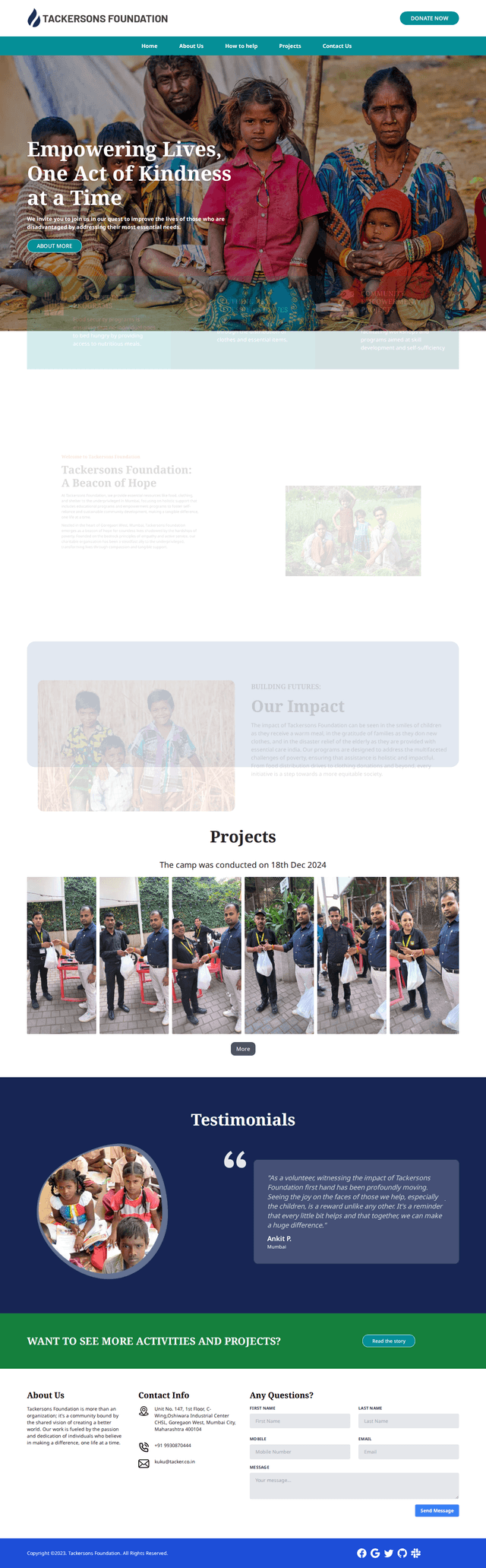
A warm, credibility-driven website for Tackersons Foundation, a Mumbai charitable nonprofit, built around genuine relief-camp photography and a real Certificate of Incorporation.

Shri Raam Astrologer
A warm, credible website for Shri Raam Astrologer, a Mumbai Vedic astrology practice, built around a glowing zodiac wheel hero and tasteful parchment-scroll service graphics.

Pulp India
A confident, near-black portfolio website for Pulp, an independent Bandra brand strategy and design agency, built around a striking mixed-media project grid and personal partner bios.

Policy Grace
A cinematic, tech-forward website for PolicyGrace, a Mumbai InsurTech insurance broker, built around a striking eagle hero photograph and real dashboard mockups.
What we can show
Evidence that comes from the work itself.
This website is built with Next.js and a Laravel content system, so we can show the practices described here in a real project. We do not quote speed scores or traffic figures.
- App Router in production
- Our own site uses the App Router, metadata handling, on-demand revalidation and a headless content set-up, which we can explain on a call.
- TypeScript components
- Typed components with clear server and client boundaries, written so a new developer can find where a thing lives.
- Written caching rules
- A single document listing what is cached, for how long and what refreshes it, which is rarely found in client projects.
- Preview and publishing flow
- Editor preview and publishing tested with the people who will use it before launch.
Start the conversation
Describe the site, the content and the team.
Tell us what the site must do, who edits it and where it will run. We reply with questions and a recommendation, including a plain no if Next.js is not the right tool. Speed and search outcomes are never promised.
Frequently asked questions
Questions before you start.
It suits sites that need flexible content, application-like features or strong control over rendering. For a small brochure site edited by non-technical staff, WordPress may serve you better, and we say so when that is the case.
Yes. We connect Next.js to a headless or API-based content system and test preview and publishing with your editors. We recommend the content system after hearing how your team works, not before.
Yes. If your company has developers, we can follow your conventions, work on branches and hand over through pull requests so the code stays in one place and under your review.
On a host your company chooses after we explain the trade-offs between options. Hosting costs are separate from our fees, and the deployment steps are documented so you are not dependent on us to release.
We build with performance practices such as efficient images and careful loading, and we report what we measured at handover. Scores depend on content, hosting and later additions, so we do not promise a particular result.
Yes. Architecture notes, a README for running and deploying the project and a list of rendering and caching rules are part of the handover, with the full list confirmed in the proposal or contract.
Keep exploring
Locations
Explore Our Locations
We proudly serve clients in major cities worldwide, delivering exceptional web design, development, and digital marketing services.