Next.js Development · Mumbai & Worldwide
Rendering, content and deployment,
architected as one system.
Next.js websites and web applications built around the routing, data-fetching and rendering decisions each page actually needs — not a single default template applied everywhere. Speed and search visibility depend on those decisions, not the framework name alone.

Prateeksha builds Next.js websites and web applications in Mumbai, planning routing, data fetching and rendering strategy per page rather than applying one default template. Performance and search visibility depend on those architectural decisions, image and asset weight, and hosting — not the framework name alone. Migrations are planned with a redirect map and validation pass to reduce risk, not promised as risk-free.
Where Next.js projects go wrong
Most slow or hard-to-maintain Next.js sites made the same architecture mistakes early.
- 01
Rendering strategy applied as a default
Every page server-rendered, or every page statically built, regardless of what that specific page actually needs.
- 02
A client-heavy app doing server-side work
Data fetching and business logic pushed to the browser when it could run once on the server.
- 03
Fragile CMS or API integration
Content and data wired in ad hoc, with no plan for caching, revalidation or failure handling.
- 04
Inconsistent components
UI rebuilt page by page instead of drawn from a shared, documented component set.
- 05
Deployment left as an afterthought
Build, environment and monitoring decisions made at launch instead of planned from the start.
What an architecture-first build changes
Routing, rendering and data decisions made deliberately, page by page.
We plan the App Router structure, data-fetching pattern and rendering mode for each page against what it actually needs — not a single default applied everywhere. Need a broader React application where Next.js is not the deciding factor? See our React development service.
- A rendering strategy chosen per page, not applied as one default
- CMS and API integration planned for caching and failure handling
- A documented, reusable component structure
- Deployment and environment decisions made before launch, not after
- A redirect map and validation pass for any migration, to reduce risk
What's included
Every stage a Next.js project actually needs, in order.
Scoped to what your routes, data sources and traffic genuinely require.
Architecture & discovery
Discovery
UI & component implementation
Implementation
App Router development
App Router
CMS & API integration
Integration
Performance diagnosis
Diagnosis
Migration planning
Migration
See migration approachTesting
QA
Ongoing maintenance
Care plans
Explore maintenanceHow delivery runs
Assess, architect, build, validate, operate — in that order.
The same sequence for a focused marketing site or a larger application.
Assess
Routes, data sources, integrations and current performance understood before any build decision.
Architect
Rendering strategy and component structure planned per page, not applied as a default.
Build
App Router development with TypeScript, wired to real data with caching considered from the start.
Validate
Testing, and for migrations, a redirect map and validation pass before cutover.
Operate
Deployment, monitoring and a maintenance plan so the application stays current after launch.
What changes
A generic React SPA vs. an appropriately structured Next.js application.
Both can render the same content. The difference is whether rendering and data decisions were matched to what each page needs.
Suited to
Built for the project your routes and traffic actually need.
Not every Next.js project needs the same architecture — we scope it to the job it has to do.
Marketing & content sites
Content-led
Web applications
Application-grade
Explore custom appsHeadless commerce frontends
Commerce
Explore ecommerceReact-to-Next.js migrations
Migration
Choose your starting point
Three ways to start, depending on where your project is today.
A new build, a migration, or a focused performance fix — each is a legitimate starting point.
Diagnose
Audit & migration plan
A review of an existing site or app, with a redirect map and rendering-strategy recommendation.
- Performance and architecture review
- Rendering-strategy recommendation per page
- Redirect map for migrations
- A written plan you can act on either way
Recommended
Focused build
A new Next.js site or application built to the architecture the assessment recommends.
- App Router development in TypeScript
- CMS/API integration with caching planned
- Component structure documented for reuse
- Testing before launch
Ongoing
Support & iteration
Maintenance and incremental improvements after launch, as routes and data needs evolve.
- Dependency updates & monitoring
- Performance diagnosis as traffic grows
- Incremental feature work
- See our website maintenance service
What ships with every Next.js engagement
Architecture documentation
A written record of routing, rendering-strategy and data-fetching decisions and why they were made.
A documented component set
Reusable TypeScript/React components with usage notes, so future pages stay consistent.
Redirect map (for migrations)
Old URLs mapped to new ones, validated before cutover to reduce the risk of lost visibility.
Testing before launch
Verification against the routes, rendering modes and integrations actually shipped.
Deployment notes
Build, environment and hosting configuration documented, whatever platform you deploy to.
Handover & support options
Code, docs and credentials handed over, with a maintenance plan available if you want it.
Website Design

A confident, finance-grade website for Wise Business Plans, a business plan and funding advisory firm serving founders, investors and USCIS immigration cases.

A luxurious, architecture-led website for TouchKey, India's premium smart biometric door lock brand, built around real product photography and genuine installation galleries.
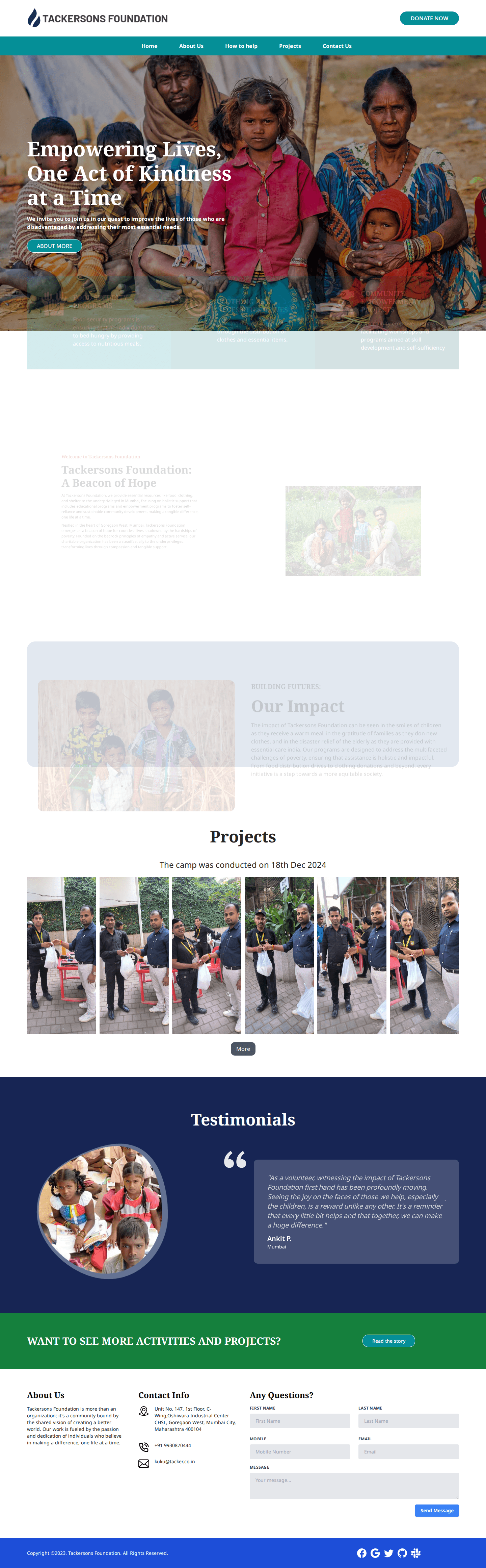
A warm, credibility-driven website for Tackersons Foundation, a Mumbai charitable nonprofit, built around genuine relief-camp photography and a real Certificate of Incorporation.

A warm, credible website for Shri Raam Astrologer, a Mumbai Vedic astrology practice, built around a glowing zodiac wheel hero and tasteful parchment-scroll service graphics.

A confident, near-black portfolio website for Pulp, an independent Bandra brand strategy and design agency, built around a striking mixed-media project grid and personal partner bios.

A cinematic, tech-forward website for PolicyGrace, a Mumbai InsurTech insurance broker, built around a striking eagle hero photograph and real dashboard mockups.

Wise Business Plans
A confident, finance-grade website for Wise Business Plans, a business plan and funding advisory firm serving founders, investors and USCIS immigration cases.

TouchKey
A luxurious, architecture-led website for TouchKey, India's premium smart biometric door lock brand, built around real product photography and genuine installation galleries.
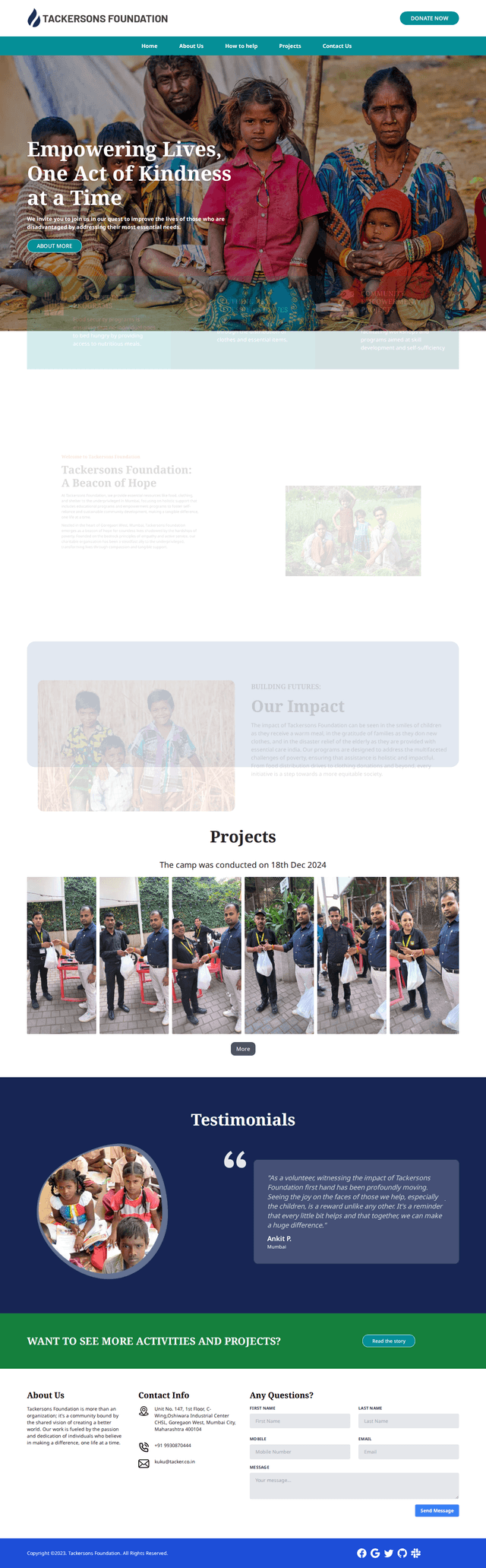
Tacker
A warm, credibility-driven website for Tackersons Foundation, a Mumbai charitable nonprofit, built around genuine relief-camp photography and a real Certificate of Incorporation.

Shri Raam Astrologer
A warm, credible website for Shri Raam Astrologer, a Mumbai Vedic astrology practice, built around a glowing zodiac wheel hero and tasteful parchment-scroll service graphics.

Pulp India
A confident, near-black portfolio website for Pulp, an independent Bandra brand strategy and design agency, built around a striking mixed-media project grid and personal partner bios.

Policy Grace
A cinematic, tech-forward website for PolicyGrace, a Mumbai InsurTech insurance broker, built around a striking eagle hero photograph and real dashboard mockups.











Built for the long run
Architecture a future developer can actually work with.
What stood out was the codebase itself — clean structure, sensible naming, and pages that load fast without us having to think about it. Handovers to our internal team were straightforward because nothing felt improvised.
15+
Service categories covered
Including Next.js, React and custom app builds
4
Delivery regions
India, USA, UK and Europe
1
Shared delivery process
Discovery, build, QA, and ongoing maintenance
Ready to talk through your project?
Tell us about your routes and data — we'll recommend an architecture, not a default.
Share your current site or product plans. You'll get an honest rendering-strategy recommendation and a scoped starting point before any commitment.
FAQs
Next.js development — frequently asked questions.
Straight answers on rendering choices, migration risk and what this engagement can and cannot promise.
Not sure if Next.js is the right fit? Tell us your project and we'll advise honestly, including if a different approach suits better.
No — a framework alone does not guarantee speed or rankings. Performance depends on the rendering strategy chosen per page, image and asset weight, data-fetching decisions, caching and hosting. Next.js gives you the tools to make those choices well; we still have to make them well.
No. We choose the rendering approach per page — static generation for content that rarely changes, server rendering for personalised or frequently updated content, and incremental revalidation in between. SSR is not automatically the right choice for every page.
Yes. We plan the migration around your existing URLs and indexed content, with a redirect map and a validation pass before launch. This reduces the risk of losing search visibility during the move — it is a risk-reduction practice, not a guarantee that every ranking is preserved.
We advise on deployment and can deploy to platforms such as Vercel or your own infrastructure, but we do not currently offer a managed-hosting service with a published uptime SLA. If ongoing hosting management matters to your project, tell us and we'll scope it honestly rather than assume it.
Costs vary by scope — page count, integrations, data sources and performance work all affect it. Share your brief and we will provide a clear estimate against a defined scope.
Most focused sites complete in 3–8 weeks; migrations or applications with more integrations take longer. We provide a milestone plan up front.
Yes, as one architecture option among several. See our dedicated Ecommerce and Shopify pages for platform-specific commerce work — this page covers Next.js website and application development generally.
Yes — maintenance plans covering dependency updates, monitoring and fixes, so the application stays current rather than being left to drift. See our website maintenance service for what is included.
Locations
Explore Our Locations
We proudly serve clients in major cities worldwide, delivering exceptional web design, development, and digital marketing services.