Public and Private Journeys
Visitors, prospective members and current members each get a defined route, so public information stays easy to reach.
We design and build websites for associations, nonprofits, clubs and member organisations, from a clear public site to a separately scoped custom community platform. Access rules, roles and integrations are agreed in discovery, not assumed.

A public community website is built around information: who you are, what is happening and how to take part. A community platform goes further, with accounts, roles, protected content and member-to-member features. They need different planning, and many groups need only the first, or the first now and the second later. Online community website design covers both, and we scope them separately.
Our approach is discovery-led. We work out your audiences, access needs and governance before choosing a platform, then build what the agreed scope needs. The intended value is practical: clearer information, simpler member journeys, publishing your team can manage and an architecture that can evolve. Outcomes depend on your community, leadership and activity. Paid membership has its own page, see membership sites.
Visitors, prospective members and current members each get a defined route, so public information stays easy to reach.
Who can read, post, approve and administer is written down before sign-in or permissions are built.
Notices, events, resources and member listings sit on reusable templates your team can maintain.
Component-based builds and documented integrations leave room to add features later without a rebuild.
We select technologies to fit the agreed scope. They are not partner badges, certifications or performance promises.
Fast, server-rendered public pages and member-facing interfaces built from reusable templates
Accessible interface components for directories, filters and registration flows
Content back end, forms, roles and APIs for structured community websites
Familiar editing for groups that publish notices, news and events often
Consent-aware page and enquiry reporting where included in the agreed scope
Managed tracking for form submissions, registrations and outbound links

Communities run on information people can find and trust.
Before anyone joins, attends or contributes, they look for answers on a phone or laptop. Community website design is largely about making those answers, and the right next step, easy to reach for each audience.
Community websites fail in predictable ways. These are the problems we diagnose before proposing pages, features or software.
Notices live in email, event details in chat and documents on social posts, so members cannot tell where the current version is.
When the public and members follow the same path, newcomers cannot see how to join and members cannot find what is theirs.
Listings, events and documents without a clear owner or an easy editing workflow quickly fall out of date.
Roles, permissions, moderation, consent and privacy settled after launch lead to rework or to features nobody dares switch on.
Picking software first means discovering missing integrations, access rules or data limits only after money has been spent.
A build that cannot add a directory, a member area or a new integration makes every future step an expensive rebuild.
Seven connected workstreams cover a public community website, member features and a custom community platform. Not every project needs all of them. Broader bespoke application logic falls under custom web application development.
A written plan for who the site serves, what each audience needs, and where the public site ends and members-only features begin.
Community website design starts with people, not software. We list your audiences (visitors, prospective members, current members, committee and moderators) and map what each of them needs to do. From that comes a sitemap, a content outline and a short scope statement that records which parts are public, which need sign-in and which are deliberately left out of the first release.
Gives design, content and development one agreed plan and a stated scope boundary.
A clear, maintainable public website that explains who you are, what is happening and how to join or get in touch.
Many community websites need no login at all: an about section, notices and news, a resources area, leadership or committee pages, and a general contact route. We build these on reusable templates so your team can add a notice or a new page without rebuilding anything. Accessibility, mobile layout and readable type are part of the build, because members of any age may arrive on any device.
Puts the information visitors and members look for in one structured, editable place.
Member sign-in, role-based access and gated pages, scoped once your access requirements are written down.
When some content must be limited to members, we define the roles first: who can read, who can post, who can approve and who administers. Authentication method, password reset, member onboarding and what happens when a membership lapses are confirmed in discovery. Paid or subscription-led membership is a distinct service with its own page, and privacy, consent and data-retention decisions stay with your organisation.
Turns agreed access rules into sign-in, roles and protected pages, rather than leaving them to guesswork.
Searchable listings of members, businesses or local services, with profile fields and visibility settings agreed up front.
A member directory website looks simple until questions of privacy appear: which fields are public, which are for members only, and who may edit an entry. We design the listing, search and filter experience around those answers, and decide whether entries are managed by administrators or by members themselves. Imports from an existing spreadsheet or database are scoped separately once we have seen the data.
Helps visitors and members find the right person or organisation without exposing details you have not agreed to publish.
Forums, comments or announcement channels added where your community wants them, with moderation decided before launch.
A discussion area is only useful if someone looks after it. We help you decide whether a forum, comment threads or simple announcements fit your group, and whether to connect a third-party community tool you already use or invest in community platform development as a custom build. Moderation rules, reporting routes and safeguarding for younger or vulnerable members are your organisation’s policies; we build the tools to apply them but do not set them.
Adds a conversation layer only when there is a moderation plan to support it.
Publish upcoming events, take registrations through a provider you choose, and keep documents and recordings easy to find.
We build event listings with dates, venues, descriptions and a clear sign-up path. Where payment is needed, registration connects to a payment provider you select, and the provider, not the website, handles card details. Past minutes, newsletters and recordings can sit in a searchable resource library so members stop asking where a document went.
Keeps dates, sign-ups and documents in one place your team updates itself.
A content system your team can run, connected to the tools you already use and built so features can be added later.
A custom community website still needs a CMS your team can run. We build on either WordPress or a Next.js front end with a Laravel back end, and confirm the choice in the written proposal. Integrations with email tools, payment providers, a membership database or an existing community platform are scoped one by one. Consent-aware analytics shows which pages and enquiry routes are used, and the component-based build lets you add modules later without starting over. After launch we train your editors and hand over documentation.
Keeps day-to-day updates with your team and leaves a clear path for future features.
Choosing community website developers is mostly about method: scope and governance first, access rules mapped before code, and a build your team can maintain.
We confirm audiences, access rules, moderation ownership and integrations in discovery, then recommend the platform that fits.
Member journeys and a role matrix are agreed before development, so access behaves as you decided, not as a default setting dictates.
The public website and any member-facing application share design, navigation and content, instead of feeling like two separate products.
We build with reusable components on Next.js, React, Laravel or WordPress and document each API or integration so it can be changed later.
Layouts are tested on phone, tablet and desktop, your editors are trained, and documentation and maintenance options follow launch.

The Process
Timing depends on scope, content readiness, integrations and review rounds, so your written proposal confirms the schedule. Every stage ends with something you can review and a checkpoint you approve.
Who is this for, and what must it do?
We review your audiences, content, existing tools, access needs and who owns moderation, privacy and consent decisions.
Who sees and does what?
We draft the sitemap, content model, role and permission matrix and the journeys for visitors, members and administrators.
What will it look like, and what will it run on?
We prototype key pages and flows for desktop and mobile, and recommend the platform and integrations that fit the agreed scope.
Does everything work as agreed?
We build the templates and features, connect agreed integrations, load content and test forms, access rules and mobile behaviour on staging.
Can your team run it, and what comes next?
We publish, confirm live forms and integrations, train your editors and moderators, hand over documentation and agree a list of later improvements.
As a community website design agency, we begin with a conversation rather than a build. The first consultation covers your audience, public and private scope, roles, content, events, integrations, governance, migration and how you will measure whether the site is working.
You receive a written scope before you commit to anything.
Start with a consultationShare general contact details only. Please do not send member lists, passwords, health or safeguarding records or other sensitive personal data through this form.
Selected Work
These are public community websites we have built, shown for their structure, content and contact routes. They are not examples of authenticated member platforms, and we do not present them as such.
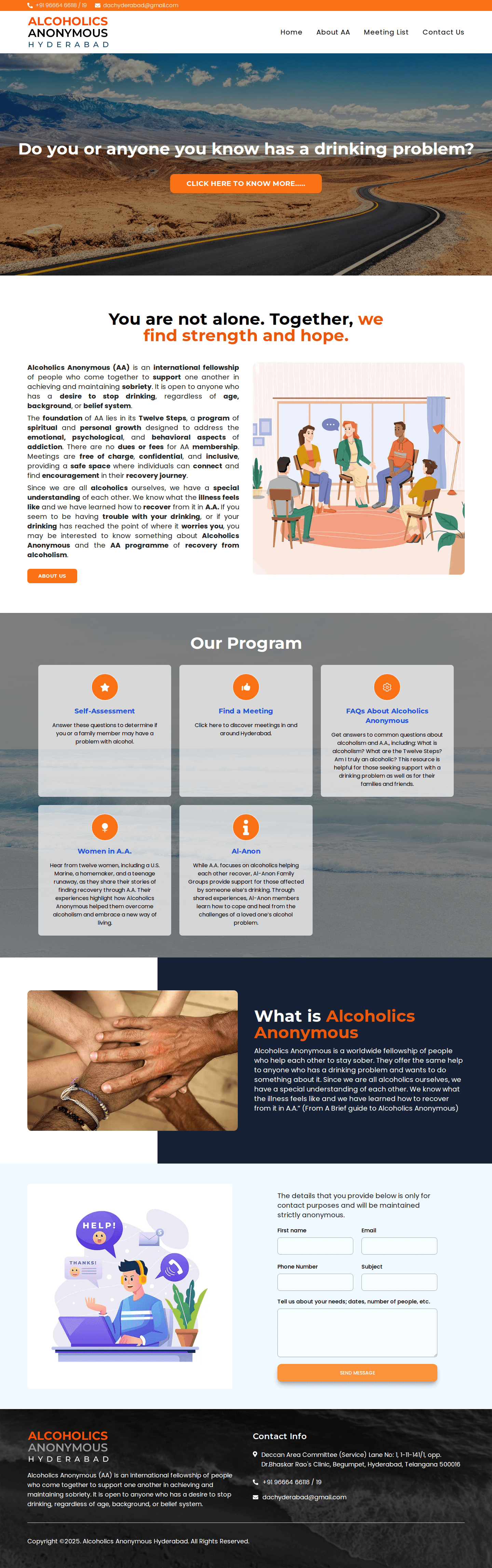
Public website for a support fellowship, with programme sections, meeting information and a contact form.
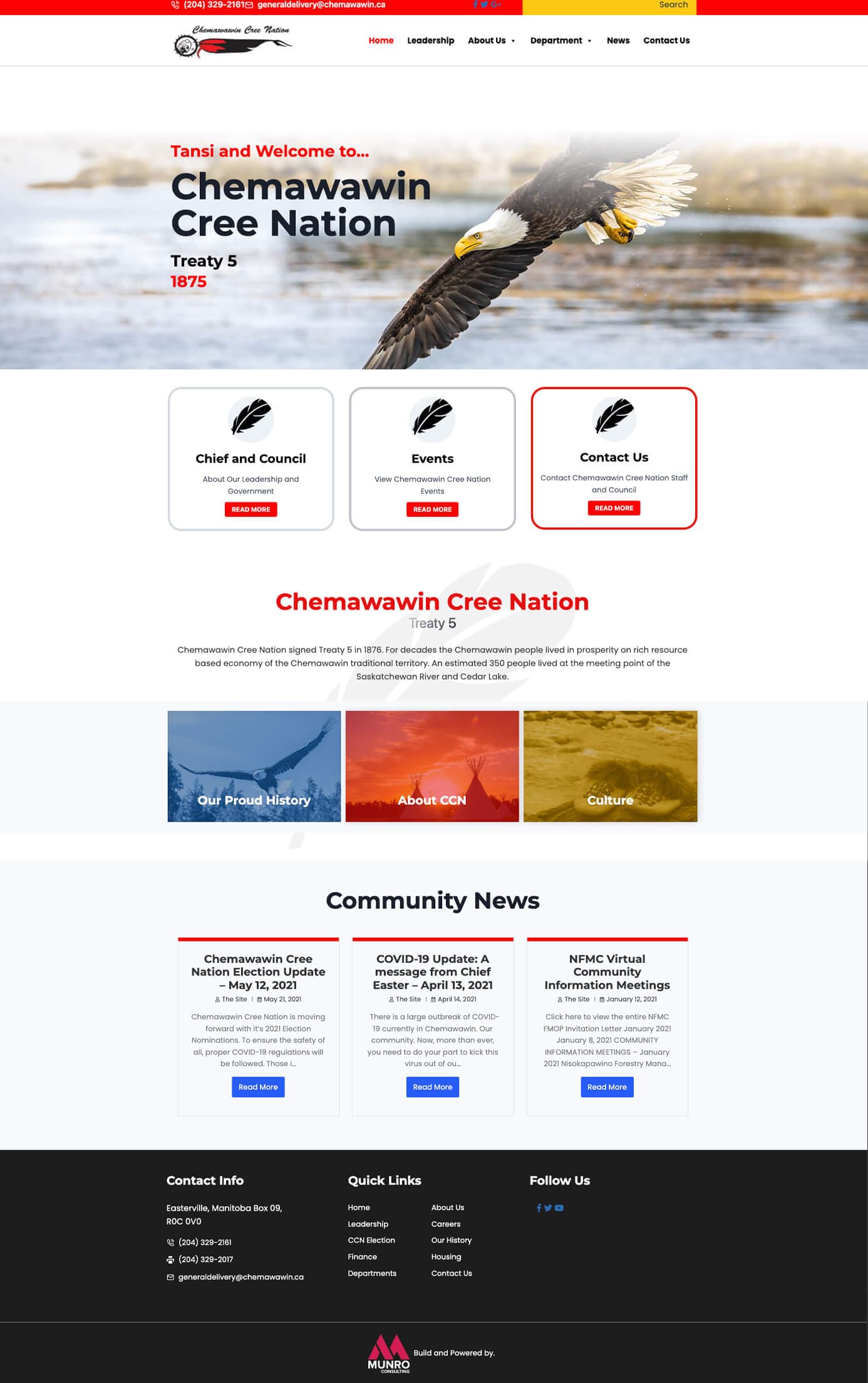
Public community website with leadership, events and community news sections linked from a structured homepage.
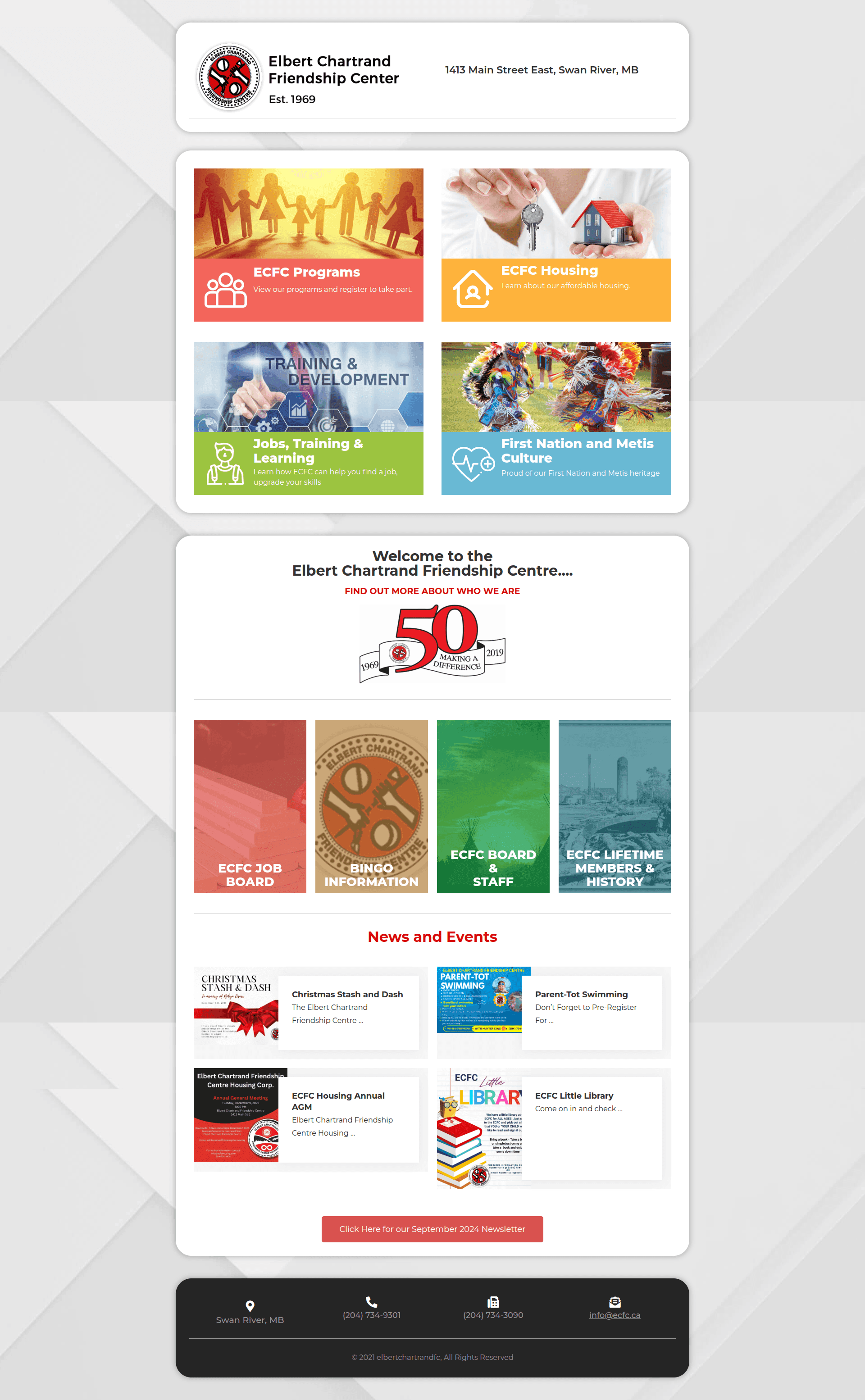
Friendship centre website with programme and service links on the homepage, an organisation history page and a news and events page.
FAQs
Straight answers on scope, member access, moderation, platforms and what is decided in discovery.
Not sure which format fits? Compare all website formats or talk to us.
It depends on the community. A public community website typically covers an about section, notices and news, events, resources, leadership pages and a contact route. Member directories, sign-in, discussion areas and registrations are added only where your group needs them, and each is scoped separately in discovery.
A public community website is open to every visitor and is mainly about clear information. A private community platform adds accounts, roles, protected content and often member-to-member features, so it needs a custom community platform scope with its own authentication, permissions and data-handling decisions. Many groups start with the public site and add platform features later.
Yes, where your requirements call for it. We define the roles first (for example member, moderator and administrator), then confirm the sign-in method and what each role may see or do. Access rules are written down and agreed before development starts.
A directory lists members, businesses or local services with search and filters. Which profile fields are public, which are for members only and who may edit an entry are decisions made with you, because they affect privacy. Importing existing records is scoped after we have reviewed your data.
A forum can be integrated from a third-party community tool you already use, or built as part of a custom community platform. Moderation is your organisation’s responsibility: the rules, who enforces them and how reports are handled need explicit input from you. We build the moderator tools and workflow to apply those decisions.
Event listings and registration forms are straightforward. Where payment is needed, registration connects to a payment provider you choose, and that provider handles card details, not the website or Prateeksha. The integration is scoped to the specific provider.
Yes. Association website design and nonprofit community website design both involve serving several audiences at once, such as members, volunteers, supporters and the public, so we plan separate journeys for each. Donation or membership payment features depend on the provider you choose and are scoped individually.
Where a project suits it, yes. We build on WordPress for teams that want familiar editing, and on Next.js with a Laravel back end where a more tailored build is needed. The choice is confirmed in the written proposal against your content, access and integration needs; see our WordPress service for more on that route.
We choose the platform after discovery, not before it: access rules, integrations, content volume and your team’s editing needs decide whether a CMS build, a third-party tool or a custom build fits. Migration of existing pages, members or posts is scoped once we have seen what exists and how clean the data is.
Layouts are built responsive and checked on phone, tablet and desktop, with readable type, accessible contrast and visible keyboard focus. Accessibility-conscious design is part of the build; we do not claim formal compliance certification unless it is separately agreed and tested.
Both depend on scope: the number of pages, whether sign-in, directories, registrations or integrations are needed, and how ready your content is. After a consultation you receive a written proposal with the scope, schedule and cost, so you can compare options before committing.
Yes, as an optional plan. Maintenance covers updates, fixes and content support scoped to your agreement, and we train your editors and hand over documentation at launch so routine updates stay in your hands. We do not promise any uptime level.
Comparing formats? See all website formats, or look at our WordPress development service.
Locations
We proudly serve clients in major cities worldwide, delivering exceptional web design, development, and digital marketing services.